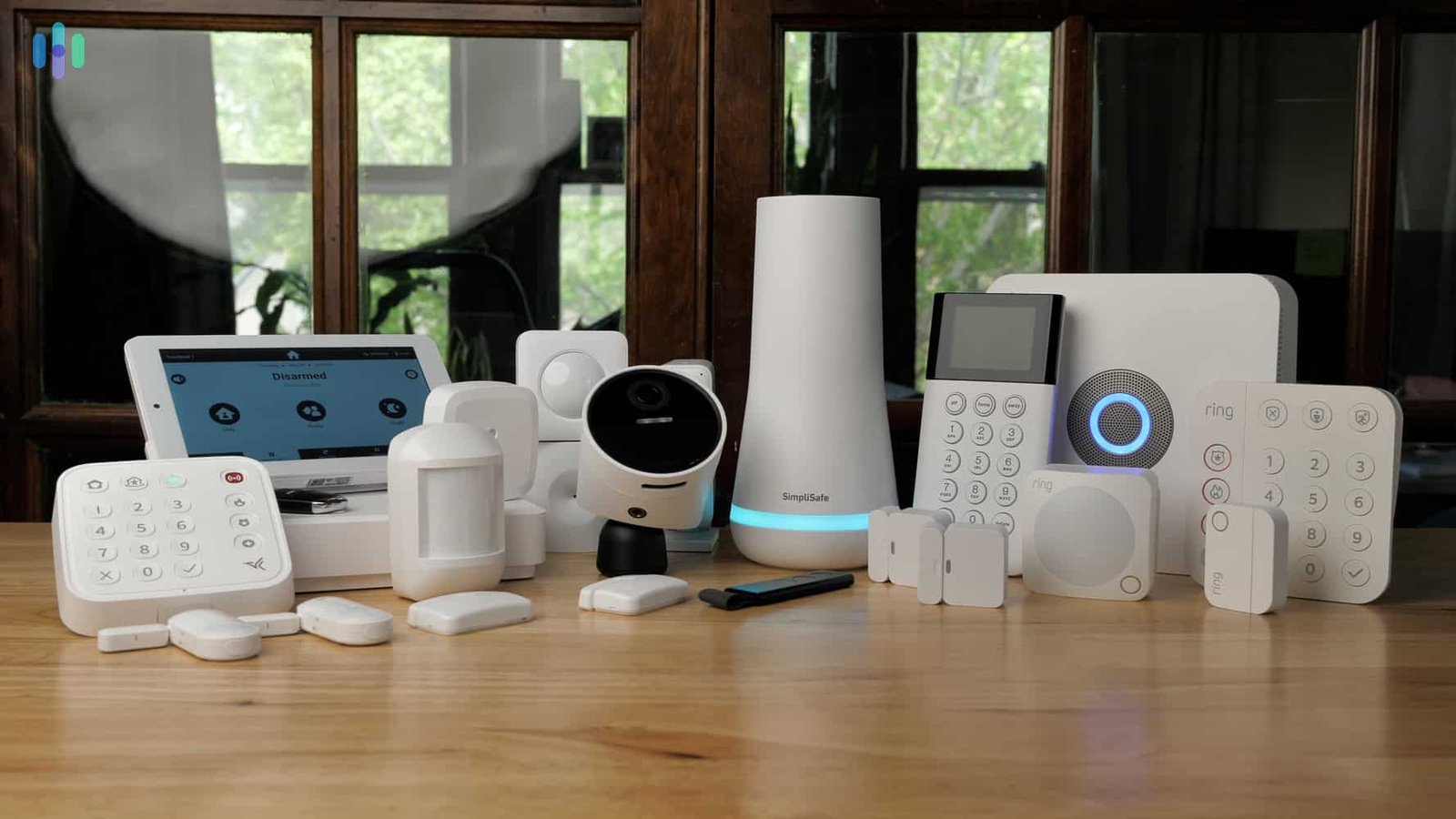
Home security has become an important part of everyday life in the United States. Homeowners, renters, families, and people who travel frequently want reliable ways to protect their properties, monitor activity, and receive alerts when something unusual happens. Modern home security systems offer much more than traditional burglar alarms. They can combine door and window sensors, motion detectors, security cameras, smart locks, video doorbells, smoke alarms, and mobile applications into one connected protection system.
In 2026, American consumers have several types of home security systems to choose from. Some companies offer professional installation and 24/7 monitoring, while others focus on affordable do-it-yourself equipment that users can install themselves. Some systems work with popular smart home platforms, and others provide their own complete ecosystems of cameras, sensors, and automation features.
Choosing the right system depends on several factors, including the size of the property, the number of entry points, the household budget, internet reliability, installation preferences, and the level of monitoring required. A renter living in an apartment may need a compact wireless alarm system, while a homeowner with a large property may prefer professional installation, outdoor cameras, glass-break sensors, and continuous monitoring.
Price is also an important consideration. The initial equipment cost is only one part of the total expense. Monthly monitoring fees, cloud video storage, installation charges, replacement batteries, and optional smart home devices can increase the overall cost over time. Comparing these expenses before making a decision can help consumers avoid paying for features they do not need.
The best home security system is not necessarily the most expensive or the one with the largest number of devices. It is the system that fits the property, provides useful protection, is easy to operate, and offers dependable support when something goes wrong.
This guide explores the best home security systems in the USA for 2026, including professionally monitored services, DIY alarm systems, smart cameras, and budget-friendly options. It also explains how to compare features, understand monitoring plans, improve home safety, and select a system that provides long-term value.
What Makes a Home Security System Good in 2026?
A good home security system should make it easier to identify potential threats, respond quickly to emergencies, and keep track of what is happening around a property. However, the exact features that matter most vary from one household to another.
One of the most important features is reliable detection. Door and window sensors should identify when a protected entry point opens, while motion detectors can alert users to movement in selected areas. Glass-break sensors may provide an additional layer of protection by detecting sounds associated with breaking glass. These devices work best when they are positioned carefully and configured according to the property’s layout.
Mobile alerts are another important feature. A security system should notify the homeowner when an alarm is triggered, a camera detects relevant activity, or a device loses its connection. Clear notifications help users understand what has happened without needing to check every device manually.
Camera quality also matters. Modern security cameras may offer high-definition video, night vision, wide viewing angles, two-way audio, motion zones, and person detection. Some systems distinguish between people, vehicles, animals, and general movement, reducing unnecessary alerts. These features are especially useful for homes with busy streets, pets, or frequent deliveries.
Professional monitoring can provide an additional level of protection. When an alarm is triggered, a monitoring center may contact the homeowner and follow the agreed response procedure. Depending on the service, trained operators may request emergency assistance when appropriate. Monitoring terms, verification requirements, and local emergency-response practices vary, so consumers should review the actual service agreement.
Finally, a good system should be simple to use. Complicated controls can cause users to leave the alarm disarmed or ignore notifications. A practical system should allow household members to arm and disarm the alarm, check camera footage, manage access permissions, and review alerts without unnecessary difficulty.
Best Home Security Systems at a Glance
Several established brands serve different needs in the American home security market. Their products, pricing, available equipment, and service plans can change, so buyers should verify current details before purchasing.
SimpliSafe is a strong option for people who want flexible DIY installation with the choice of professional monitoring. Ring Alarm is attractive to households already interested in video doorbells and connected cameras. ADT is worth considering for consumers who prefer a professionally installed system and a more traditional monitored security service.
Vivint focuses on integrated smart home security, while Abode offers flexible equipment and smart home compatibility. Frontpoint is known for DIY-oriented systems with monitoring options, and Cove targets customers looking for a relatively straightforward alarm setup.
For camera-focused protection, Google Nest and Arlo offer useful video monitoring options, although camera systems and complete alarm systems are not interchangeable. Eufy Security appeals to consumers interested in local storage and reducing ongoing cloud-storage costs on compatible devices.
The right choice depends on whether the priority is professional response, low upfront cost, camera coverage, smart home integration, flexible installation, or fewer recurring fees.
1. SimpliSafe: Best Overall Home Security System
Best for: Homeowners and renters who want flexible security without a complicated installation process.
SimpliSafe is one of the strongest options for American households seeking a balance between convenience, customizable equipment, and professional monitoring. Its systems are designed for people who want to install most of the equipment themselves but still have the option of connecting their alarm to a professional monitoring service.
A typical SimpliSafe setup includes a base station, keypad, entry sensors, and a motion sensor. Additional devices can be added according to the size and layout of the home. Consumers can select smaller packages for apartments or larger packages for houses with several bedrooms, doors, and windows.
The base station acts as the central control point. Entry sensors can be installed on doors and windows, while motion detectors help monitor interior areas such as hallways, living rooms, and entryways. Compatible cameras can provide visual information when activity is detected, allowing users to assess an alert instead of relying exclusively on an alarm sound.
One of SimpliSafe’s main advantages is installation flexibility. Many customers can place the sensors and configure the system without drilling extensively or hiring a technician. This is particularly useful for renters who want to avoid permanent changes to their properties. Professional installation may also be available for customers who prefer assistance.
Monitoring plans are an important part of the SimpliSafe decision. Some features are available without a paid plan, while advanced monitoring, video storage, and certain camera-based services require eligible subscriptions. Buyers should compare the capabilities of each plan rather than assuming that every device feature will work without recurring fees.
Another advantage is that SimpliSafe offers packages for different levels of protection. A small household may need only a few entry sensors and one motion detector, while a larger property could benefit from additional sensors, cameras, and environmental alerts.
The main limitations are its relatively focused smart home ecosystem and the potential cost of advanced monitoring. People who want extensive automation involving lighting, thermostats, locks, and many third-party devices may find other platforms more suitable.
Overall, SimpliSafe is a practical choice for consumers who want a modern alarm system, straightforward installation, and the option of professional support without immediately committing to a complex whole-home installation.
2. Ring Alarm: Best for DIY Security and Video Doorbells
Best for: People who want to combine an alarm system with doorbell cameras and outdoor security cameras.
Ring is a popular option for households interested in monitoring entrances, driveways, porches, and other outdoor areas. Its product range includes alarm equipment, video doorbells, indoor cameras, outdoor cameras, and compatible smart devices. This makes it possible to build a security setup around the areas that matter most.
A Ring Alarm package commonly includes a base station, keypad, contact sensor, motion detector, and range extender. Larger packages add more sensors, while compatible cameras and doorbells can expand the system’s visual coverage.
Ring’s mobile application is a central part of the experience. Depending on the equipment and subscription, users may be able to review video, receive activity alerts, manage connected devices, and control the alarm remotely. This can be useful for people who frequently leave home, receive deliveries, or want to check their property while traveling.
Video doorbells are particularly useful for monitoring the front entrance. They can show visitors, record deliveries on supported plans, and allow two-way communication through a compatible phone. Outdoor cameras can provide additional coverage for garages, side entrances, backyards, and driveways.
Ring is also attractive to people who prefer a DIY installation. Most wireless equipment can be installed without hiring a technician, although the difficulty depends on the number of devices and the type of camera mounting required. Battery-powered products can simplify installation, while wired devices may require more preparation.
The main consideration is subscription dependence. Some features, such as video recording, extended history, remote app controls, and professional alarm monitoring, may require a paid plan. Consumers should check which functions are included in the exact package they intend to purchase.
Privacy is another consideration for any camera-based system. Users should review motion zones, account permissions, recording settings, and available privacy controls. Outdoor cameras should be positioned to monitor the user’s property without unnecessarily recording neighbors’ private spaces.
Ring is especially suitable for households that want visible cameras and a connected alarm system within one ecosystem. It may be less attractive to consumers who want a fully featured alarm system without recurring fees or who prefer to avoid cloud-connected cameras.
3. ADT: Best for Professional Home Security
Best for: Homeowners who prefer professional installation, ongoing monitoring, and support from an established security provider.
ADT is a long-established name in the American home security industry. It offers professionally installed systems as well as self-setup options, giving customers different ways to protect their properties. Its services may include intrusion detection, smart home controls, cameras, environmental sensors, and 24/7 professional monitoring.
A professionally installed system can be helpful when a property has several entry points, multiple floors, detached garages, or other areas that require careful sensor placement. A technician can help determine where equipment should be installed and explain how to use the alarm and mobile application.
ADT’s professional monitoring service is one of its main attractions. When a connected alarm is triggered, monitoring personnel can follow the response procedure associated with the customer’s plan. Depending on the circumstances, they may contact the homeowner, verify an event using supported equipment, or notify emergency services.
Consumers should understand that professional monitoring does not guarantee a particular emergency response time. Outcomes depend on the nature of the alert, local procedures, communication availability, and the response of the relevant authorities.
ADT also offers connected security features that can be managed through a mobile application. Depending on the package, users may be able to check alarm status, receive notifications, control compatible smart devices, and review camera activity.
The most important issue to consider is cost. Professional installation and more comprehensive monitoring may cost more than a basic DIY system. Some professionally installed arrangements may also involve longer contractual commitments, financing terms, early cancellation fees, or minimum equipment purchases.
Before signing an agreement, buyers should ask for a complete breakdown of equipment costs, installation charges, monitoring fees, contract duration, cancellation terms, warranty coverage, and the cost of adding devices later.
ADT is a strong option for people who value professional assistance and continuous monitoring. Customers who want to avoid long contracts or install everything independently should compare its self-setup offering with other flexible systems.
4. Vivint: Best for Integrated Smart Home Security
Best for: Homeowners who want security, smart locks, cameras, and home automation to work together.
Vivint focuses on connected home security systems that combine alarms, video surveillance, smart locks, and automation features. It is particularly appealing to households that want more than a basic intrusion alarm.
A Vivint system can be configured around the home’s layout and the customer’s preferred level of automation. Possible components include a central control panel, entry sensors, motion detectors, indoor and outdoor cameras, video doorbells, smart locks, and compatible environmental devices.
The integrated approach allows security and convenience features to work together. For example, a homeowner may configure compatible lights to respond to selected events or use a smart lock to manage access for trusted visitors. Exact functions depend on the equipment and service plan.
Professional installation can help ensure that devices are positioned appropriately and that the system is configured as intended. This is valuable in larger homes or properties where cameras, sensors, and automation devices need to work together across multiple rooms and entrances.
Vivint’s cameras can provide visual information around a property, while sensors detect activity at protected entry points. A combination of these technologies may be more useful than relying on cameras alone. Cameras can show what happened, but entry sensors can detect a door opening even when a camera’s view is obstructed.
The biggest disadvantage is the potential overall cost. Equipment, professional installation, financing, and monitoring can make Vivint more expensive than a basic DIY system. Contract conditions and equipment ownership arrangements deserve particular attention.
Consumers should ask whether the equipment is purchased outright or financed, how long monitoring is required, whether early cancellation creates additional charges, and what happens to equipment functionality if the service is discontinued.
Vivint is best for homeowners who want a more integrated smart home experience and are comfortable paying for professional setup. It may be excessive for someone who only needs a simple alarm for a small apartment.
5. Abode: Best for Smart Home Compatibility
Best for: Technology-focused users who want to connect home security with compatible smart home devices.
Abode is worth considering for people who want a flexible DIY security system with smart home integration. Rather than focusing only on alarms and sensors, the platform is designed to work with supported connected devices and automation features.
A basic setup may include a security hub, entry sensors, and other accessories selected according to the property. Customers can add motion detectors, cameras, and compatible smart home equipment where supported.
Abode’s appeal lies in flexibility. A homeowner may want an alarm system that works alongside connected lights, smart locks, or voice assistant platforms. Compatibility varies by device and system configuration, so it is important to check the exact model and required subscription before purchasing additional equipment.
DIY installation can help reduce upfront costs. Wireless sensors can generally be placed around the home without a complex installation process. Users should still test each device after installation to confirm that the hub receives alerts and that the sensors are placed where they can detect relevant activity.
Abode may be particularly attractive to consumers who already own compatible smart home products. Instead of maintaining separate systems for every device, they can potentially manage several functions through a more coordinated setup.
However, not every feature is included with every plan. Some integrations, remote controls, professional monitoring services, and advanced automation features may depend on the chosen subscription or hub model.
Buyers should also distinguish between smart home compatibility and professional security monitoring. A system that can automate lights or send phone notifications does not automatically provide the same service as a staffed monitoring center.
Abode is a good fit for users who enjoy customizing their smart homes and want security to be part of a broader connected environment. Consumers who want the simplest possible system may prefer a more straightforward package.
6. Frontpoint: Best for DIY Installation with Monitoring Options
Best for: Households that want to install their own equipment but still value professional monitoring.
Frontpoint offers a DIY-oriented approach to home security, with equipment and service options designed for people who prefer to manage installation themselves. This can appeal to homeowners and renters who want more control over device placement and setup.
A system can include a central hub, entry sensors, motion detectors, and compatible accessories. Larger homes may need extra sensors to cover multiple doors, ground-floor windows, garages, and other potential entry points.
The ability to install equipment yourself can reduce installation expenses and give you the freedom to expand the system later. A customer can begin with the most important entry points and add devices when the household budget allows.
Frontpoint’s monitored security offering may be useful for families who do not want to depend entirely on receiving and responding to smartphone notifications. Professional monitoring can provide a response process when the homeowner is busy, asleep, traveling, or unable to answer an alert.
However, the service agreement deserves careful review. Some offers may tie equipment discounts to monitoring commitments, and advertised prices may not represent the total cost of ownership. Ask for the complete cost of the system, the monthly fee, the contract length, and any charges that apply if you cancel.
Frontpoint may also require customers to compare its equipment range and subscription terms against alternatives before making a final decision. A DIY system is not automatically cheaper if its monitoring fees are high over several years.
Frontpoint is worth comparing for people who want a self-installed system and professional support. It is most attractive when the equipment package and monitoring terms fit the household’s budget and protection requirements.
7. Cove: Best for a Straightforward Alarm Setup
Best for: Consumers who want a relatively simple security system without an elaborate smart home installation.
Cove focuses on home alarm protection and offers an alternative to more complex security ecosystems. Its appeal is the ability to build a system around the essential functions that matter to a household, including entry detection and motion monitoring.
A typical alarm setup may use a central control device, door and window sensors, motion detectors, and additional equipment selected according to the property. The exact components available depend on the current product lineup and service package.
For a small home or apartment, a straightforward system may be sufficient. The front door, accessible windows, and main living areas are often the most important starting points. Additional sensors can be added if there are multiple entrances or areas that need separate monitoring.
Cove may appeal to users who want a system that is easier to understand than a broad smart home platform. Not every household needs automated lighting, advanced camera analytics, or a large collection of connected devices. A well-configured alarm with suitable monitoring may address the household’s primary concerns.
Consumers should verify whether the desired level of protection requires a subscription. They should also examine cellular backup, battery backup, app functionality, camera compatibility, warranty coverage, and any installation assistance offered.
The main trade-off is that a simpler alarm platform may provide fewer integrations than some smart home competitors. People who want a single application to manage a wide range of cameras, locks, lighting, and automation devices should check compatibility carefully.
Cove can be a sensible option for consumers who prioritize essential alarm functions and want to avoid building an unnecessarily complicated system.
8. Google Nest: Best for Smart Cameras and Video Doorbells
Best for: Households that want video monitoring and already use compatible Google smart home products.
Google Nest is best understood as a smart home security and camera option rather than a direct substitute for every feature offered by a complete alarm system. Its cameras and video doorbells can help users monitor entrances, rooms, and outdoor areas through a connected application.
Camera-based protection is useful because it provides visual context. If a notification reports movement near the front door, the homeowner may be able to view the event and determine whether it involves a delivery, a visitor, a pet, or something more concerning.
Compatible cameras may offer high-definition video, night vision, motion detection, activity zones, and person recognition features. Available capabilities vary by model, region, and subscription. Users should confirm whether event history, advanced detection, and video recording are included or require an additional service.
A Google Nest camera setup can work particularly well for people who already use compatible Google Home devices. The integration can simplify management of cameras and selected smart home functions.
However, a camera-only system has limitations. A camera may not see every door or window, and it may miss activity outside its field of view. It also cannot necessarily replace an entry sensor or loud alarm. For stronger protection, cameras can be combined with a separate alarm system.
Privacy should be a priority when installing indoor cameras. Cameras in shared living areas should be configured carefully, and users should avoid placing them in private spaces where recording would be inappropriate. Account security and access permissions are equally important.
Google Nest is a useful choice for video-focused monitoring, especially for households that value a connected smart home experience. Buyers who need a complete professionally monitored burglar alarm should evaluate the additional equipment and services required.
9. Arlo: Best for Flexible Camera Coverage and Detection
Best for: People who want to monitor multiple outdoor areas and receive more useful activity alerts.
Arlo is primarily known for its connected security cameras, doorbells, and related monitoring products. It is an attractive option for homeowners who want to monitor driveways, gardens, garages, entrances, and other areas around their properties.
Camera selection is important because no single model suits every location. A battery-powered camera may be convenient for an area without an electrical outlet, while a wired camera can be preferable where continuous power is available. Weather resistance, viewing angle, night vision, and mounting options should all be considered before buying.
Some Arlo products offer detection features that can distinguish between different types of activity. These functions can help reduce unnecessary notifications, particularly in locations where trees, traffic, wildlife, or changing light conditions cause frequent motion alerts. Advanced detection may require a subscription or compatible equipment.
Arlo cameras can be used to create a broader view of a property. A front-door camera may capture visitors, a driveway camera may monitor vehicles, and a backyard camera may cover an area that is not visible from the street. The goal should be to cover useful zones rather than simply install as many cameras as possible.
Some Arlo devices also work with security sensors and other monitoring features. Buyers should carefully distinguish the capabilities of a camera package from those of a complete alarm system, particularly when professional monitoring is important.
Subscription costs are a major consideration. Video storage, advanced alerts, and some connected features may require ongoing payments. A cheaper camera can become more expensive over several years if it depends on a costly plan.
Arlo is best for consumers who prioritize camera coverage and intelligent activity detection. It is especially useful when paired with an alarm system that protects doors and windows.
10. Eufy Security: Best for Local Video Storage Options
Best for: Consumers who want flexible camera systems and wish to limit recurring cloud-storage expenses.
Eufy Security offers cameras, video doorbells, and compatible home security devices. Some of its products support local storage, giving consumers an alternative to relying entirely on paid cloud video services.
Local storage can be attractive to households that want to keep recordings within their own equipment. Depending on the product, video may be stored on a compatible hub or another local storage device. Buyers should confirm the storage capacity, encryption options, remote access behavior, and what happens if the hub is damaged or stolen.
Eufy’s product range includes battery-powered and wired cameras, doorbells, and other devices for monitoring different parts of a property. The best configuration depends on the locations that need coverage and the household’s preference for easy installation or continuous power.
A camera system can be useful for checking deliveries, monitoring a garage, or reviewing activity around a backyard. However, camera detection is not a replacement for an alarm sensor at every entry point. A well-designed setup combines visual monitoring with appropriate physical detection.
One advantage of local storage is the possibility of reducing ongoing cloud-storage costs. Nevertheless, not every feature is free, and subscription terms can differ between products. Users should compare the total price of the equipment and any optional services rather than assuming that all Eufy devices have identical operating costs.
Privacy and network security remain important. Users should protect their accounts, update device software, use strong passwords, and enable additional account protection where available. Local storage does not eliminate every possible privacy or cybersecurity risk.
Eufy Security is a strong candidate for camera-focused households that value storage flexibility. Consumers who need a professionally monitored alarm should verify whether the specific products and service options meet that requirement.
11. Wyze: Best Budget-Friendly Camera Security
Best for: Budget-conscious households that want basic video monitoring and accessible equipment.
Wyze is worth considering for consumers who want to add cameras and smart devices without spending as much as some premium security brands require. Its product range has included indoor cameras, outdoor cameras, doorbells, and home monitoring options, although availability and features can vary by model.
For people who want to begin with a modest budget, a camera placed near the front entrance or overlooking a driveway can provide useful visibility. Additional cameras can be installed in other areas as the budget allows. This approach makes it possible to improve coverage gradually rather than purchasing an expensive whole-home package immediately.
Wyze cameras may offer features such as motion alerts, night vision, and video recording options. The exact capabilities depend on the product and whether a subscription is required. Buyers should carefully examine the storage and notification options available with the model they choose.
The main advantage is affordability. However, a low equipment price does not automatically mean the entire system will be inexpensive over several years. Monthly services, optional storage plans, replacement equipment, and accessories should all be included when calculating the total cost.
Consumers should also understand the difference between camera monitoring and alarm protection. A camera can capture activity, but a dedicated alarm system may be better suited to detecting an opened door or window and sounding a siren. Households that want professional emergency response should verify that their chosen service actually includes it.
Wyze is best viewed as an accessible starting point for video security. It may suit apartments, small homes, and people who want to supplement existing security equipment. For comprehensive protection, users may want to combine compatible cameras with suitable entry sensors and a reliable alarm system.
How Much Does a Home Security System Cost in the USA in 2026?
The total cost of a home security system depends on the equipment, installation method, monitoring service, and optional features. A small DIY kit can cost considerably less than a professionally installed system with multiple cameras and smart home devices.
A basic DIY alarm package may cost approximately $100 to $300, depending on the brand, equipment quantity, and current promotions. Larger kits with additional sensors and cameras can cost several hundred dollars or more. Premium systems designed for larger homes can require a higher initial investment.
Professional installation can add to the upfront cost. Some providers include installation in particular offers, while others charge separately or bundle the cost into a financing arrangement. Always check the total amount payable rather than relying only on an advertised monthly payment.
Monitoring expenses also vary. Some systems offer limited self-monitoring without a monthly fee, while others charge for remote controls, advanced notifications, video history, or professional monitoring. Professional monitoring may cost from roughly $20 to $60 per month for many standard offerings, with specialized services potentially costing more. These figures are broad planning estimates, not guaranteed prices for any particular company.
The long-term cost can be significant. A service costing $30 per month adds up to $360 annually and $1,800 over five years, before taxes, price changes, and equipment expenses. Comparing five-year costs can reveal whether a system advertised at a low upfront price is genuinely economical.
Consumers should also budget for extra sensors, batteries, replacement equipment, mounting accessories, and potential permit or false-alarm fees where applicable. Some local governments require registration for monitored alarm systems, and rules differ between jurisdictions.
A useful comparison includes the purchase price, installation, monitoring, storage subscriptions, cancellation fees, and warranty terms. The lowest initial price is not always the best value.
DIY vs. Professionally Installed Home Security Systems
One of the most important decisions is whether to install the system yourself or hire a professional.
DIY systems are generally designed to be installed by the customer. Wireless sensors can often be attached to doors and windows, and a central hub can be connected to the home network. This approach can reduce installation costs and give users greater flexibility when moving equipment or expanding the system.
DIY security is especially useful for renters and people who prefer to avoid long installation appointments. It can also make sense for smaller homes where a limited number of sensors will cover the main entry points.
However, self-installation requires attention to detail. A sensor attached incorrectly may not detect an opening reliably, and a motion detector placed in an unsuitable location can generate repeated false alarms. Users must also test their equipment and learn how to operate the system properly.
Professional installation is more suitable for complex properties. An installer can assess entry points, position devices, configure the control panel, and explain the system’s operation. This may be valuable in larger houses, properties with several floors, or homes that require integrated cameras and smart locks.
The trade-off is cost and, in some cases, contract flexibility. Professionally installed systems may involve installation charges, financing arrangements, and longer monitoring commitments. Before agreeing, consumers should ask what they own, what they rent, and whether equipment will continue functioning if the monitoring service ends.
Neither installation method is automatically superior. The best choice depends on the property’s complexity, the homeowner’s confidence, the service agreement, and the amount of assistance desired.
What Features Should You Look for in a Home Security System?
Door and Window Sensors
Entry sensors are fundamental components of many alarm systems. They detect when a protected door or window opens and can trigger an alarm or notification when the system is armed.
Ground-floor windows, main entrances, patio doors, and accessible garage doors are often sensible priorities. Homes with many entry points may require additional sensors to achieve adequate coverage.
Motion Detectors
Motion detectors monitor selected indoor areas for movement. They are useful in hallways, living rooms, and other locations that an intruder might cross after entering the property.
Placement matters. Pets, heating equipment, sunlight, and moving objects can affect some detectors. Follow the manufacturer’s installation instructions and choose suitable equipment for households with animals.
Security Cameras
Cameras provide visual evidence of activity. Indoor cameras can monitor selected shared areas, while outdoor cameras can cover entrances, driveways, garages, and backyards.
Before buying, compare image quality, night vision, field of view, weather resistance, power options, storage, and the availability of useful activity alerts.
Video Doorbells
A video doorbell helps users see who is at the front entrance without opening the door. Depending on the model and service plan, it may also provide two-way audio and recorded clips.
This can be especially useful for deliveries, unexpected visitors, and households where residents frequently work away from home.
Professional Monitoring
Professional monitoring connects eligible alarm systems to a monitoring center. When an alarm is triggered, staff follow the provider’s response process, which may include contacting the customer and requesting emergency assistance.
Check whether monitoring is available continuously, whether cellular backup is included, and what happens if the internet connection fails.
Cellular and Battery Backup
A security system that depends entirely on home Wi-Fi may become less effective during an internet outage. Some systems use cellular communication as a backup, while battery backup can help selected components continue operating during a power failure.
Confirm exactly which devices remain operational during an outage. Cameras, alarm sensors, the hub, and the internet router may have different backup capabilities.
Smart Locks and Home Automation
Smart locks can make it easier to manage access for household members and trusted visitors. Connected lights may also support selected automation routines, such as turning on lights when someone arrives home.
These features improve convenience, but they should be configured securely. Use strong account credentials and avoid sharing permanent access codes unnecessarily.
Environmental Sensors
Home protection should include more than burglary detection. Smoke alarms, carbon monoxide detectors, and water-leak sensors can help identify other hazards.
Some security platforms integrate with compatible environmental sensors, while others require separate devices. A connected security system should supplement, not replace, properly installed and maintained safety equipment.
Best Home Security Systems for Different Types of Homes
Best System for Apartments
Apartment residents often need equipment that can be installed without drilling or permanent modifications. A compact DIY system with a base station, a few entry sensors, and a motion detector may be sufficient for many smaller spaces.
Renters should review their lease before installing wired cameras or making changes to doors and windows. Battery-powered cameras and removable sensor mounts can provide flexibility.
They should also consider shared building entrances. A camera inside the apartment cannot necessarily monitor the building lobby or parking area, and recording shared spaces may be subject to building policies or local rules.
Best System for Large Houses
Large houses may need more entry sensors, multiple motion detectors, and cameras covering different sides of the property. A central alarm system should be able to communicate reliably with sensors throughout the home.
Professional installation may be worthwhile when the property includes several floors, detached garages, or a large outdoor area. Cellular backup and battery backup can be particularly valuable for households that want greater resilience during outages.
Best System for Renters
Renters should prioritize portability, wireless installation, and flexible service terms. A system that can be removed and reinstalled at a new address may offer better long-term value than a permanently installed arrangement.
Before buying, verify whether the provider allows equipment relocation, whether professional installation is optional, and whether the monitoring service requires a long-term contract.
Best System for Families
Families may benefit from entry sensors, outdoor cameras, a video doorbell, and carefully configured mobile alerts. Individual user accounts and access permissions can help household members operate the system without sharing the same password.
Parents should consider privacy when choosing indoor cameras, especially in bedrooms or other private areas. Security equipment should support the family’s routines without recording more than necessary.
Best System for Frequent Travelers
People who travel regularly may prefer a combination of professional monitoring, camera access, cellular backup, and reliable mobile notifications. They should test remote access before leaving home and make sure another trusted person can assist if necessary.
A security system is only one part of preparing a home for an extended absence. Secure doors and windows, arrange for mail and packages to be managed, and avoid publicly announcing travel plans in ways that expose the property to unnecessary risk.
How to Choose the Right Home Security System
The first step is to identify the property’s most important security needs. Walk around the home and consider each potential entry point, including front doors, rear doors, accessible windows, garage entrances, and sliding patio doors.
Next, decide whether an alarm system, cameras, or a combination of both is necessary. Cameras are useful for visual monitoring, while entry sensors and motion detectors can trigger an alarm when the system is armed. Many households benefit from using both technologies together.
Set a realistic budget that includes ongoing costs. A system that seems affordable initially may require a subscription for video storage, cellular backup, advanced alerts, or professional monitoring. Read the plan details before purchasing the equipment.
Consider installation preferences. If you want a quick setup with minimal changes to the property, a wireless DIY system may be appropriate. If the house is large or you want an integrated smart home system, professional installation may be worth the additional expense.
Check connectivity and backup options. A system should be suitable for the home’s Wi-Fi coverage, and consumers who want continued alarm communication during an internet outage should look for appropriate backup support.
Finally, examine the service agreement. Understand the contract duration, cancellation conditions, warranty, equipment ownership, and what happens if you move. Avoid selecting a system based only on a limited-time discount or a low advertised monthly payment.
Tips for Getting the Best Value in 2026
Home security equipment is frequently sold in bundles and promotional packages. A larger package can offer good value, but only if its extra devices are useful for the property.
Start by identifying the minimum equipment needed for effective coverage. A small apartment may not need six cameras, while a large detached home may need more than a basic alarm kit. Compare the package price with the cost of purchasing individual devices.
Review subscriptions carefully. Some households may be satisfied with basic alerts and local storage, while others want cloud video history and professional monitoring. Pay only for features that support your actual needs.
Check warranty terms and return policies before purchasing. Security equipment should be reliable, and customers need to understand what happens if a sensor, camera, or hub stops working.
Consider future expansion. A system that supports additional sensors and cameras may be more economical than replacing the entire setup when your needs change. Compatibility should be verified before buying accessories from different product lines.
Also evaluate the total cost over several years. Include equipment, subscriptions, installation, accessories, and possible cancellation charges. A slightly more expensive system with flexible terms may be a better long-term purchase than a discounted system tied to a costly contract.
Home Security Mistakes to Avoid
One common mistake is relying entirely on cameras. Cameras may provide useful recordings, but they can have blind spots and may not trigger a loud alarm when a door opens. Combine them with appropriate sensors where necessary.
Another mistake is installing too few sensors. Protecting only the front door may leave accessible windows, rear entrances, and garage doors unmonitored. Coverage should reflect the actual layout of the property.
Ignoring subscription requirements can also create problems. Some users purchase cameras expecting continuous recording, only to discover that their desired storage features require a paid plan. Verify feature availability before buying.
Consumers should not overlook false alarms. Incorrect sensor placement, pets, or unfamiliarity with the controls can lead to unnecessary alerts. Test the system, learn the alarm procedures, and keep contact details up to date.
Weak account security is another avoidable risk. Use a unique password, enable multifactor authentication when available, update devices, and review who has access to the security application.
Finally, do not assume that every security provider offers identical emergency-response services. Professional monitoring terms vary, and a phone notification is not the same as a staffed monitoring center. Confirm what happens when an alarm is triggered.
Are Home Security Systems Worth It in 2026?
For many households, a home security system can be a worthwhile investment because it improves awareness of activity around the property and can make it easier to respond to potential problems. Entry sensors, cameras, and alarms provide different kinds of information, and a suitable combination can offer more comprehensive coverage than a single device.
The value depends on the property, the equipment, and the owner’s expectations. A modest DIY system may be sufficient for someone who wants to monitor a small apartment, while a large home may benefit from more extensive equipment and professional monitoring.
A security system cannot guarantee that a burglary or other emergency will never occur. Cameras may miss activity, sensors can fail, communications can be interrupted, and emergency response depends on several factors beyond the equipment itself.
Nevertheless, carefully selected and properly maintained security equipment can contribute to a broader home safety plan. Good locks, exterior lighting, secure windows, sensible privacy settings, and responsible account management remain important.
Final Thoughts
The best home security systems in the USA for 2026 offer a range of options for different budgets, properties, and lifestyles. SimpliSafe is a strong all-around choice for flexible DIY installation and optional professional monitoring. Ring is attractive for households that want alarms and video doorbells together, while ADT is worth considering for customers who prefer professional installation and ongoing monitoring.
Vivint is a strong option for integrated smart home security, Abode suits users who prioritize smart home compatibility, and Frontpoint offers another DIY-oriented approach with monitoring options. Cove may appeal to households seeking a simpler alarm setup. Google Nest and Arlo are useful for camera-focused monitoring, while Eufy and Wyze provide alternatives for consumers comparing storage options and equipment costs.
Before making a purchase, consider the size of the property, the number of entry points, installation requirements, monitoring fees, privacy controls, and backup capabilities. Compare total costs rather than looking only at the equipment price.
A well-chosen security system should be easy to use, suitable for the property, and reliable enough to support everyday home safety. By comparing available features and understanding the long-term costs, American homeowners and renters can select a solution that meets their needs in 2026 without paying for unnecessary equipment or services.
For More Information About Article, Click Here.
For More UseFul Articles, Click Here.